How users opt in to Imprest text messages
Last updated August 27, 2026
This page documents the consent flow for Imprest's SMS program ("Text your books"), through which customers of our accounting software text questions about their own account data and receive answers, plus one-time enrollment verification codes. It exists for carrier and campaign reviewers: the opt-in screen lives inside the authenticated product, so this page reproduces it at a public URL.
Where opt-in happens
The only way to opt in is from within a user's authenticated Imprest account at app.imprest.ai under Settings → Notifications → Text your books. The user enters their own mobile number into the form shown below and actively checks the consent checkbox.
- There is no keyword opt-in, no web form outside the authenticated app, and no other opt-in channel.
- Phone numbers are never purchased, imported, or enrolled by anyone other than the account holder; Imprest sends messages only to numbers that have completed this flow.
- Consent is not a condition of purchasing or using Imprest — the feature is off until the user enables it here.
The opt-in screen
This is the enrollment form exactly as it appears in the product:
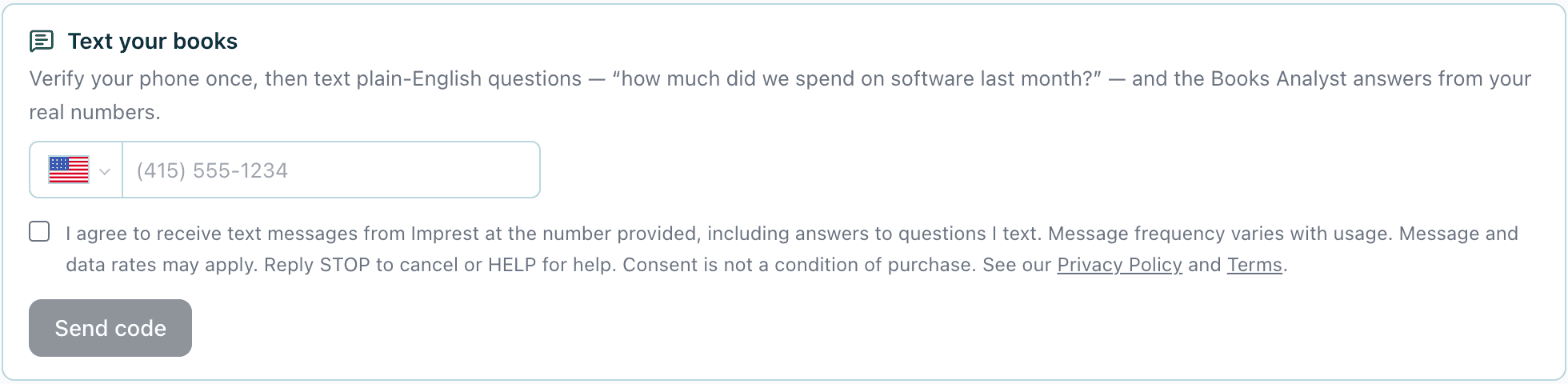
Settings → Notifications → "Text your books" in the authenticated Imprest app. The "Send code" button stays disabled until a valid US mobile number is entered and the consent checkbox is checked.
Consent checkbox (verbatim)
Consent is collected through an explicit checkbox displayed directly beneath the phone number field, above the "Send code" button. The checkbox is unchecked by default and is never pre-checked; the user must actively check it. Every path that sends a message — the "Send code" button and the optional use-your-sign-in-number shortcut — remains disabled until the box is checked, so consent cannot be given implicitly by submitting the form. The checkbox label reads:
I agree to receive text messages from Imprest at the number provided, including answers to questions I text. Message frequency varies with usage. Message and data rates may apply. Reply STOP to cancel or HELP for help. Consent is not a condition of purchase. See our Privacy Policy and Terms.
"Privacy Policy" in the checkbox label links to imprest.ai/privacy, which includes our text messaging (SMS) terms, and "Terms" links to our Terms of Service, which carry the SMS program terms at imprest.ai/terms.
Double opt-in verification
Enrollment is a double opt-in:
- Tapping Send code texts a one-time 6-digit verification code to the number the user entered: "Imprest: your verification code is 123456. It expires in 5 minutes."
- The user must type that code back into the settings screen. Entering it proves possession of the phone and completes the opt-in; the consent timestamp is recorded at that moment.
- A welcome message confirms enrollment and restates the program terms: "Imprest: you're set up. Text me questions about [business name]'s books and I'll answer from your real numbers. Msg&data rates may apply. Reply STOP to opt out, HELP for help."
- After enrollment, messages are conversational: the user texts a question and Imprest replies to it.
Opt-out and help
- Replying STOP (or CANCEL, QUIT, OPTOUT, UNSUBSCRIBE, STOPALL, REVOKE, END) opts the number out immediately; a final confirmation message is sent and no further messages follow.
- Replying HELP (or INFO) returns program help information.
- Users can also disable the feature at any time from the same settings screen where they enrolled.
Consent data
No mobile information is shared with third parties or affiliates for marketing or promotional purposes. Text messaging originator opt-in data and consent are not shared with any third parties. See the SMS section of our Privacy Policy.