Choosing software
The best QuickBooks alternatives for small business in 2026
Moving your books to new software is a big ask, because you’ve got years of records in there. Look at how the move works before you commit, and know when something else would suit you better.
Article summary
Imprest, which publishes this page, brings your QuickBooks® Online history back to the first transaction and keeps QuickBooks running while you try it. Xero™ suits a team of several people, Zoho Books suits a business on other Zoho apps, FreshBooks suits a business that mainly invoices, and Wave has a $0 plan. Each fits a different business, so try two first.
QuickBooks is a registered trademark of Intuit Inc. Xero is a trademark of Xero Limited. This comparison is independent and is not sponsored, endorsed, or approved by Intuit or Xero.
On this page
What changes when you move to Imprest?
Start with your history. From QuickBooks Online, every transaction comes back to your first one, attachments included. That matters at tax time, when someone asks for the invoice behind a number from three years ago.
Your accountant gets a seat at no charge on every plan. On Starter, it’s you plus your accountant. Pro and Scaling have unlimited users, so adding a bookkeeper or a second person in the office doesn’t add a seat fee.
AI is making us more efficient, and we believe those savings should be passed on to small businesses in the form of stable everyday low pricing. Our plans are on the pricing page.
Day to day, Imprest’s AI sorts your bank transactions and drafts entries for you to approve. A few things post without you touching them. Bank rules you’ve set to post, payouts from Stripe, Shopify and Square, and Gusto pay runs all do. So does anything you enter through Claude or ChatGPT, which you can connect to your Imprest books on every plan. You can also ask questions about your books in your own words.
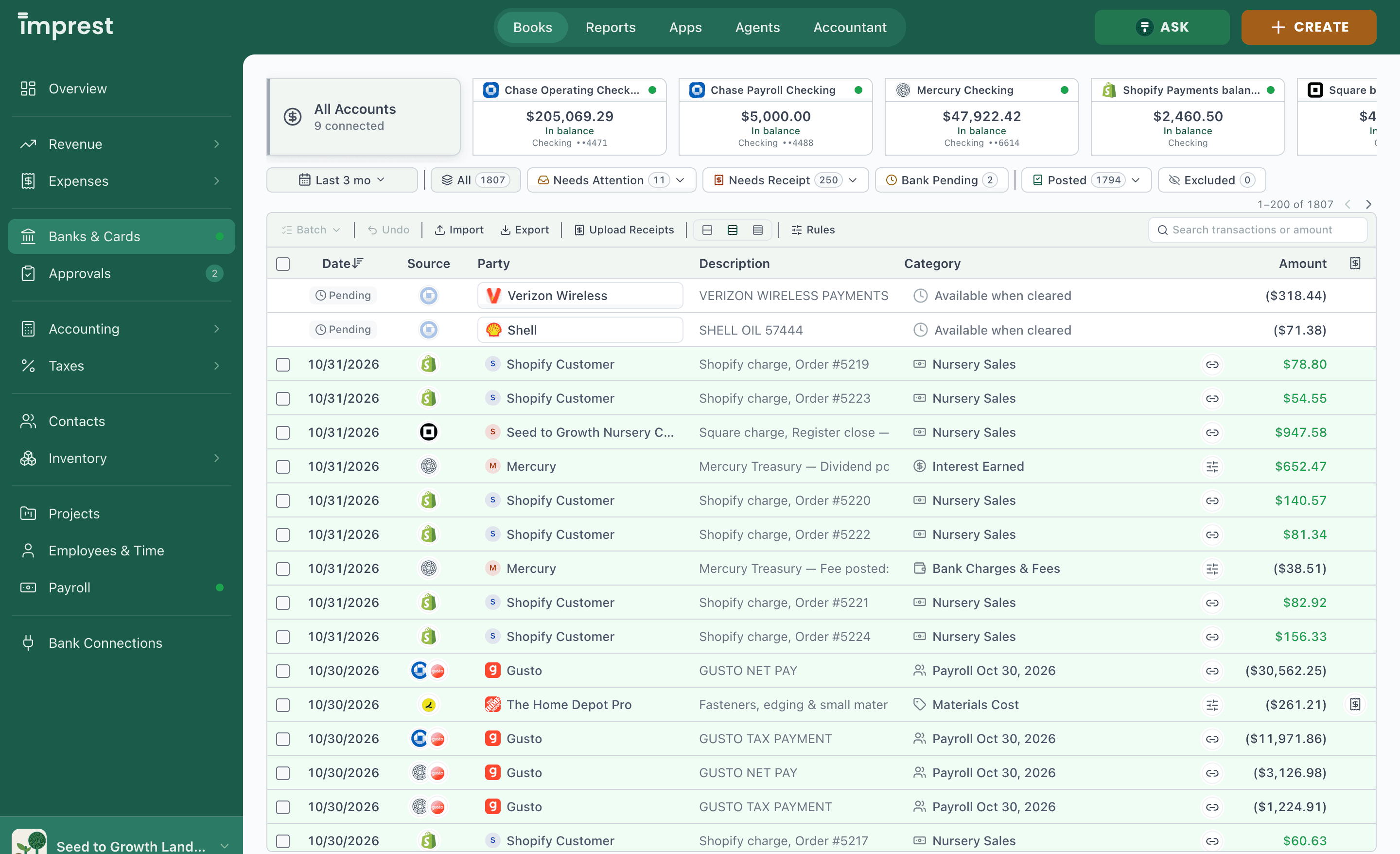
If you sell online, Imprest connects to Stripe, Shopify and Square and books each sale and payout. It sends invoices and takes card payments through your own Stripe account, and adds no fee on top of Stripe’s. Inventory starts on Pro, with FIFO (first in, first out: your oldest stock is costed first) or average cost, plus assemblies and location or department tags. If you run more than one company and want one combined report, which accountants call consolidated, that’s on Scaling, and we turn it on for you, company by company.
When do businesses start looking at other software?
A new hire or a second company is a natural time to look again, and QuickBooks may well still be the answer. Start with how each tool counts seats. QuickBooks Online Simple Start has one user, Essentials three, Plus five and Advanced 25, with accountant seats on top of every paid plan. Zoho Books Standard has three users, and Xero has no per-user license fees.
Then look at how each tool handles a second company. Each QuickBooks Online company has its own subscription, and so does each Zoho Books organization, FreshBooks business and Xero organization.
If you’re on Desktop, Intuit stopped selling new Pro Plus, Premier Plus and Mac Plus subscriptions to US customers after September 30, 2024. Existing subscribers can still renew, so you can pick the moment to move to the cloud.
How does the move work?
You don’t have to stop QuickBooks to try Imprest. QuickBooks Online stays your system of record until the day you switch. What you enter there copies over every day or two, or sooner when you press Sync Now. So you can keep working the way you do now and check your own numbers in Imprest before you switch, starting with the 30-day trial.
Before you switch, Imprest checks each account against your QuickBooks trial balance. A trial balance is the list of every account and its balance on one date. When the two lists tie out, your balances came over, and if one is off you can look into it while QuickBooks is still your system of record.
The switch is final. QuickBooks syncs one last time and then stops for good. That’s by design. If both systems kept pulling in the same bank transactions, every dollar would be counted twice. A common choice is the first of a month, once the month before it is closed, so the cutover lines up with a clean period end.
On QuickBooks Desktop for Windows, a small tool reads your company file and brings your full history in one move. You then compare a trial balance in both for the same date. There’s no side-by-side period for Desktop, so pick the day ahead of time.
You’ll set up recurring templates, sales tax rates and bank feeds again. Estimates, purchase orders, past reconciliations and the audit log stay in QuickBooks. Payroll costs come over as journal entries, while your payroll records stay in QuickBooks. Moving your books costs nothing extra on any plan, and the 30-day free trial doesn’t need a card. The full list is on the switching page.
Whatever you choose, ask whether your open invoices and bills come over as open items, so your receivables and payables still show who owes what. And export your reports before you cancel. The guide to exporting everything from QuickBooks Online says what to save first, and how to switch from QuickBooks Online walks through the whole move.
How do the options compare?
Six tools, same questions. Every fact comes from the vendor’s own site or help center, and the sources at the bottom carry the dates. Imprest publishes this page and sits in the first row.
Cost and seats
| Product | Lowest paid plan, a month (source, date) | Free plan | Users and accountant access |
|---|---|---|---|
| Imprest (publisher of this page) | On the Imprest pricing page | No. 30-day trial, no card | Starter: you plus your accountant. Pro and Scaling: unlimited users. A free accountant seat on every plan |
| QuickBooks Online | $38 Simple Start. Intuit, November 1, 2026 | Free, 1 user | 1, 3, 5 or 25 users by plan, plus 2 accountants (3 on Advanced) |
| Xero | $27 Early. Xero, November 1, 2026 | No | No per-user license fees, so your accountant joins at no seat cost |
| Zoho Books | $20 Standard, or $15 billed yearly. Zoho, November 1, 2026 | Free, for revenue under $50,000 a year | Free: 1 user plus 1 accountant. 3 users on Standard, 5 on Professional, more at $3 a user |
| FreshBooks | $23 Lite. FreshBooks, November 1, 2026 | No. 30-day trial | Accountant access from Plus. Team members $11 a month each |
| Wave | $19 Pro. Wave, November 1, 2026 | Starter, $0 | Free tax-pro and payroll-manager roles. Admin, editor and viewer roles on Pro |
Fit and history
| Product | Good fit for | Does well | Bringing QuickBooks history over |
|---|---|---|---|
| Imprest (publisher of this page) | An owner who wants AI to do the bookkeeping | Books Stripe, Shopify and Square sales and payouts | QuickBooks Online back to the first transaction, with attachments. Desktop for Windows, full history |
| QuickBooks Online | A business whose accountant works in QuickBooks | Plans from one user to 25, with accountant seats on every paid plan | Already there |
| Xero | A team of several people, since there are no per-user license fees | A 30, 60 or 180 day cash flow forecast, by plan | A Xero partner can bring the current and previous fiscal year with Jet Convert |
| Zoho Books | A business on other Zoho apps, or one that wants to start free | E-files 1099-MISC and 1099-NEC from Standard | Free migration from QuickBooks Online or Desktop |
| FreshBooks | A business that mainly invoices | Time tracking, and online payments including Apple Pay and Google Pay | Easy Switch import on Select |
| Wave | A solo owner or freelancer on a tight budget | Invoicing and bookkeeping on Starter at $0 | Open invoices and bills re-entered, opening balances by journal entry |
Inventory, companies, payroll and AI
| Product | Inventory | More than one company | Payroll | AI |
|---|---|---|---|---|
| Imprest (publisher of this page) | FIFO or average cost from Pro | Several entities on Scaling, turned on company by company | Connects to Gusto. Pay runs post as they arrive by default | AI sorts bank transactions and drafts entries for you to approve |
| QuickBooks Online | On Plus and Advanced | Each company has its own subscription | Optional add-on | Intuit Intelligence categorizes expenses |
| Xero | Inventory Plus add-on on Growing and Established | Add organizations, with a plan for each | Xero Payroll, powered by Gusto, $36 a month plus $6 a person | JAX, Xero’s AI finance partner |
| Zoho Books | From Professional | Each business is its own organization, priced per organization | Separate Zoho Payroll app | Zoho Books advertises AI features |
| FreshBooks | Stock counts on items | Several businesses under one login, each with its own subscription | $40 a month plus $6 a user | FreshBooks offers a Claude connector |
| Wave | Kept as a balance in your own accounts, not counted by unit | Several businesses in one account, Pro billed per business | Add-on from $25 a month | Pro auto-merges and categorizes bank transactions |
How have QuickBooks prices changed?
Price is one of the first things owners compare. Here are QuickBooks list prices for the last six years, set beside U.S. inflation. The notes under the table give the date and source of every figure.
| Plan | 2020 | 2021 | 2022 | 2023 | 2024 | 2025 | 2026 | 6-year change2020 to 2026 | Per year (CAGR)2023 to 2026 | vs. inflation2023 to 2026 |
|---|---|---|---|---|---|---|---|---|---|---|
| QuickBooks Online, per month | ||||||||||
| Essentials | – | $50 | $55+10% | $60+9% | $65+8% | $75+15% | $85+13% | +70%2021 to 2026 | +12.3% | 4.0× |
| Plus | $70 | $80+14% | $85+6% | $90+6% | $99+10% | $115+16% | $140+22% | +100% | +15.9% | 5.1× |
| Advanced | $150 | $180+20% | $200+11% | $2000% | $235+18% | $275+17% | $340+24% | +127% | +19.3% | 6.2× |
| QuickBooks Desktop, per year, one user | ||||||||||
| Pro, then Pro Plus (see note 1 below the table) | $133 (see note 2 below the table) | $349.99+162% | $549+57% | $649+18% | $999+54% | $9990% | $1,351+35% | +913% | +27.7% | 8.9× |
| Premier, then Premier Plus (see note 1 below the table) | $217 (see note 2 below the table) | $549.99+154% | $799+45% | $949+19% | $1,399+47% | $1,3990% | $1,891+35% | +773% | +25.8% | 8.3× |
| U.S. inflation | – | +4.7% | +8.0% | +4.1% | +2.9% | +2.6% | +3.7% | +29.0% | +3.1% | 1.0× |
*Note 1: Not sold to new customers after 30 September 2024.
†Note 2: In 2020 Intuit still sold Pro and Premier outright (Pro $399.99, Premier $649.99), shown here spread over 3 years, about how long Intuit supports each release. One-time sales ended on 10 December 2021, so an owner who wanted a newer version had to move to the Plus subscription in the later columns. The outright license came without support (Intuit sold its Care plan separately, $299.99 a year), and Plus was on sale beside it ($299.99 and $499.99 a year).
U.S. list prices in USD before promotions. QuickBooks Online: Intuit's pricing page as the Internet Archive saved it in October of each year (21 October 2020, 17 October 2021, 15 October 2022, 15 October 2023, 13 October 2024, 16 October 2025), and Intuit's pricing page reviewed 1 November 2026 for 2026, after the increase of 1 August 2026. Intuit’s 2020 pricing page lists no Essentials, so its row starts in 2021. QuickBooks Desktop Pro and Premier, list price: 2020 is the one-time Pro 2021 and Premier 2021 license (Intuit’s Desktop page as the Internet Archive saved it on 11 November 2020). 2021 is the 2022 release from 12 October 2021 (Intuit’s product pages, Internet Archive, 17 October 2021). 2022 is Intuit’s price table for the 2023 release on Firm of the Future (2 August 2022; Premier Plus also on Intuit’s page, 22 September 2022). 2023 is Intuit’s increase of 3 October 2023 as Rightworks and Lim Dynamics reported it; 2024 is Intuit’s pricing FAQ on Firm of the Future (10 June 2024); 2025 is the price before the 1 February 2026 increase, from Intuit’s December 2025 notice as Insightful Accountant published it (2 December 2025) and three accounting firms (Intuit had announced an increase from 1 October 2025; no source we found shows Pro or Premier billed at it). 2026 reflects two increases: to $1,149 and $1,609 on 1 February 2026, then to $1,351 and $1,891 on 1 October 2026 (Intuit’s notice as Insightful Accountant published it, 14 July 2026). Plus has not been sold to new customers after 30 September 2024; existing subscribers renew. The change column runs from a row's first price to its last. Per year and vs. inflation are measured over the last three years, October 2023 to 2026. Per year is the compound annual growth over those three years, and vs. inflation divides it by U.S. inflation over the same years (BLS CPI-U, all items: annual averages for 2020 to 2025, July 2026 for 2026).
When will another option suit you better?
If you want to pay nothing, start with Wave Starter, Zoho Books Free or QuickBooks Online Free, each with a $0 plan. Imprest has no free plan. Zoho Books Free is for revenue under $50,000 a year, and QuickBooks Online Free is for one user.
For books on your own computer, you have four routes. GnuCash is free and has no subscription, and you set it up yourself. AccountEdge is $20 a month for Pro and runs on a Mac or Windows. Sage 50 Pro is $72.92 a month on Windows, with a one-year minimum. QuickBooks Desktop Enterprise starts at $2,210 a year for Gold and keeps your Desktop file and workflows. More on that route is in leaving QuickBooks Desktop.
A company that needs a full ERP (enterprise resource planning system), meaning one system for accounting, purchasing and warehouses across several companies, should look at Oracle NetSuite or Microsoft Dynamics 365 Business Central. NetSuite sells an annual license by quote, with a one-time implementation fee on top. Business Central starts at $80 per user a month, paid yearly, through a Microsoft partner.
Startups that want software built around AI from day one can also look at Digits and Puzzle. Digits lets you add extra entities free up to 250 transactions a year, and Puzzle’s Core plan has five seats, which suits a founding team.
Would you rather someone else did the books? A bookkeeping service such as Pilot will. Pilot’s Essentials plan is $99 a month for up to $100,000 in monthly expenses. It keeps the books on the cash basis, which records income and expenses when the money moves, not when you send or receive the bill.
And stay on QuickBooks when it’s working. That’s true when your accountant works in QuickBooks, or an app you rely on connects only to QuickBooks. It’s true if you run QuickBooks Payroll and want your pay history in one place. And if you’re mid-year, it can make sense to wait for the start of the next one. Current plans are in QuickBooks Online pricing 2026.
Data and methodology
Prices are US list prices before promotions, taken from each vendor’s own site on the date in the sources list. A few prices only appear after the page loads in a browser, so we read them there. Where a vendor’s pricing page didn’t answer a question, we used its help center and said so in the sources.
Suggested citation: Imprest, “The best QuickBooks alternatives for small business in 2026,” published November 2, 2026, imprest.ai/learn/quickbooks-alternatives.
Frequently asked questions
Is there anything as good as QuickBooks?
Yes, for many small businesses. Imprest, Xero, Zoho Books, FreshBooks and Wave all handle invoicing and bookkeeping, and each fits a different business. The right one brings your history over and works with your accountant. Try two side by side before you decide.
How much does QuickBooks cost?
As of November 1, 2026, Intuit lists QuickBooks Online at $38 a month for Simple Start, $85 for Essentials, $140 for Plus and $340 for Advanced, before promotions. There’s also a Free plan for one user. QuickBooks Desktop Enterprise Gold starts at $2,210 a year.
Does Microsoft have a program like QuickBooks?
Yes, Dynamics 365 Business Central. It’s an ERP (enterprise resource planning system), meaning one system for accounting, purchasing and warehouses, and it supports more than one company. As of November 1, 2026, Microsoft lists Essentials at $80 and Premium at $110 per user a month, paid yearly, sold through Microsoft partners.
Can I keep my QuickBooks history?
Not always, and it varies by tool. Imprest brings every QuickBooks Online transaction back to your first one, with attachments, and reads the full history from a QuickBooks Desktop for Windows file. Xero says a partner can bring the current and previous fiscal year. Ask any vendor how many years come over before you sign up.
Will my accountant work in it?
Most likely, but ask your accountant before you move. Every Imprest plan includes a free seat for them. Xero and Intuit both keep directories of accountants who work in their software, so you can find a local firm that already knows the one you choose.
Is there a QuickBooks Desktop alternative with no subscription?
GnuCash is free, open-source and has no subscription. Sage 50 and AccountEdge install on your computer, and both are sold as subscriptions. QuickBooks Desktop is a subscription too, and Intuit gives 12 months of view-only access after you cancel, so you can still read your file.
Sources
- Intuit, QuickBooks Online pricing: users and accountant seats per plan, inventory on Plus, optional payroll, Intuit Intelligence, checked November 1, 2026
- Intuit, QuickBooks Free compared with other free accounting software: 1 user, no accountant access, checked November 1, 2026
- QuickBooks Community, QuickBooks Team reply on adding a separate company, February 24, 2024, checked October 31, 2026
- Intuit, QuickBooks Desktop no longer sold to new US subscribers, updated October 16, 2026, checked October 31, 2026
- Intuit, “Common QuickBooks Desktop questions,” updated August 3, 2026: view-only access for 12 months after cancellation, checked November 1, 2026
- Intuit, QuickBooks Desktop Enterprise pricing (Gold, Platinum and Diamond yearly prices load after the page renders), checked November 1, 2026
- Intuit, “Find an Accountant | QuickBooks ProAdvisor” directory, checked November 1, 2026
- Xero, US pricing plans: no per-user license fees, Inventory Plus on Growing and Established, Xero Payroll powered by Gusto, JAX, checked November 1, 2026
- Xero, US common questions: add as many organizations as you like and choose a plan for each, checked November 1, 2026
- Xero, “QuickBooks alternative”: a Xero partner can use Jet Convert to bring current and previous fiscal year transactions, checked November 1, 2026
- Xero, accountants and bookkeepers page and US advisor directory, checked November 1, 2026
- Zoho Books, US pricing: Free plan (1 user plus 1 accountant, revenue under $50,000), users per plan, inventory on Professional, one organization per business, checked November 1, 2026
- Zoho Books, “Free Data Migration From QuickBooks Or Xero,” checked November 1, 2026
- FreshBooks, US pricing: accountant access, team members, payroll, Easy Switch on Select, checked November 1, 2026
- FreshBooks help, “What are items?” (Track Inventory and stock counts), checked November 1, 2026
- FreshBooks help, “How do I add and manage businesses in my account?”, checked November 1, 2026
- Wave, pricing: Starter and Pro, user roles, Pro billed per business, payroll add-on, checked November 1, 2026
- Wave help, “Switch to Wave from QuickBooks”: re-create open invoices and bills, enter balances by journal entry, checked November 1, 2026
- Wave help, “Track inventory in Wave,” checked November 1, 2026
- Sage, Sage 50 Desktop pricing, monthly view: Pro $72.92, one-year minimum, read-only access after cancellation, checked November 1, 2026
- AccountEdge, pricing and FAQ (sold as a subscription), checked November 1, 2026
- GnuCash, home page: free under the GPL, Windows, macOS and Linux, built by volunteers, checked November 1, 2026
- Oracle NetSuite, “What is NetSuite?”, “How Much Does NetSuite Cost?” section, read through the Wayback Machine copy of October 5, 2026, checked October 31, 2026
- Microsoft, Dynamics 365 Business Central pricing: Essentials $80, Premium $110 per user a month, paid yearly, through a partner, checked November 1, 2026
- Digits, pricing, checked October 31, 2026
- Puzzle, pricing, checked November 1, 2026
- Pilot, bookkeeping pricing (Pilot’s own prices), checked October 31, 2026